

Online-Hilfe zum Postleitzahlbuch
Dieses Programm unterstützt Sie bei der Suche nach Postleitzahlen bzw. den zugehörigen Orten. Weiter ist es Ihnen bei der Ermittlung von Postfach-Postleitzahlen behilflich.
Es stehen die folgenden vier Such-Modi zur Verfügung:
Benötigen Sie die Postleitzahl zu einer Ihnen bekannten Adresse? Dann kann Ihnen diese Funktionalität weiterhelfen.
Sie suchen die Postleitzahl zu einem Postfach in einem bestimmten Ort? Dann wählen Sie diesen Punkt.
Fehlt Ihnen der Ort zu einer bestimmten Postleitzahl? Dann wählen Sie diese Option.
Suchen Sie die größeren Orte, die in einem bestimmten Postleitzahlbereich liegen? Dann finden Sie sie mit dieser Abfrage.
Hier können Sie die Postleitzahl zu einer bekannten Adresse suchen.
Je nach Ort ist nur die Eingabe des Ortsnamens oder aber
auch die Eingabe des Strassennamens und ggf. der Hausnummer erforderlich.
Bei mehreren gleichnamigen Orten in Deutschland ist ggf. eine Vorauswahl
nötig, analog bei mehreren gleichnamigen Straßen in einer Stadt.
Der Radiobutton "Straßenadresse suchen" muss markiert sein.
1. Geben Sie den Ortsnamen in das Feld "Ort" ein.
- Falls Ihre Tastatur keine Umlaute bereitstellt, verwenden Sie die Alternativschreibweisen "ae" statt "ä", ... oder "ss" statt "ß", also z.B. "Muenchen".
- Klein- und Großschreibung sowie Sonderzeichen werden bei der Eingabe ignoriert.
- Nach der Eingabe betätigen Sie die Schaltfläche "Go!".
- Wird mehr als ein Ort gefunden, so erscheint der Hinweis "Ortsname nicht eindeutig, bitte wählen". Im Feld "Ort" steht dann der Eintrag "Bitte Ort auswählen" und am rechten Rand des Feldes ein Pfeil. Nach Mausklick auf diesen Pfeil öffnet sich eine Liste und Sie können den gewünschten Ort auswählen. Bestätigen Sie Ihre Auswahl wiederum mit "Go!".
- Im Ortsnamen darf der "*" (Stern) als Joker benutzt werden, z.B. statt "Dortmund" einfach "Dort*", "Dor*d","Do*tm*","*mund". Wird mehr als ein passender Ort gefunden, wird eine Auswahlliste eingeblendet (vgl. oben), wurden zuviele passende Orte gefunden, wird um eine Verfeinerung der Eingabe gebeten.
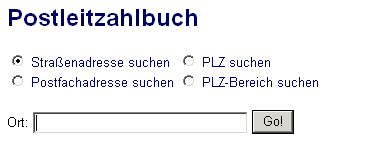
2. Wird mehr als eine PLZ für den ausgewählten Ort gefunden, wird zusätzlich der Straßenname abgefragt. Geben Sie hierzu den Straßennamen in das Feld "Straße" ein.
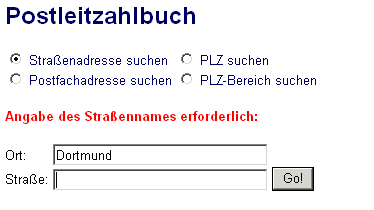
- Falls Ihre Tastatur keine Umlaute bereitstellt, verwenden Sie die Alternativschreibweisen "ae" statt "ä", ... oder "ss" statt "ß", also z.B. "Roemerstrasse".
- Mögliche Eingaben können sein: "str.", "strasse" oder "straße".
- Klein- und Großschreibung sowie Sonderzeichen werden bei der Eingabe ignoriert.
- Nach der Eingabe betätigen Sie die Schaltfläche "Go!"
- Falls in dem betreffenden Ort mehrere Straßen des gesuchten Namens existieren, so erscheint die Anzeige "Straßenname nicht eindeutig, bitte wählen". Im Feld "Straße" steht dann der Eintrag "Bitte Straße auswählen" und am rechten Rand des Feldes ein Pfeil. Nach Mausklick auf diesen Pfeil öffnet sich eine Liste und Sie können die gewünschte Straße auswählen. Drücken Sie danach auf den Button "Go!".
- Im Straßennamen darf der "*" (Stern) als Joker benutzt werden, z.B. statt "Ruhrallee" einfach "Ruhr*", "Ru*ee","Ru*al*","*allee". Wird mehr als eine passende Straße gefunden, wird eine Auswahlliste eingeblendet (vgl. oben), wurden zuviele passende Straßen gefunden, wird um eine Verfeinerung der Eingabe gebeten.
3. Wird mehr als eine Straßen-PLZ gefunden, so wird zusätzlich die Hausnummer abgefragt. Geben Sie die Hausnummer in das Feld "Hausnummer" ein.
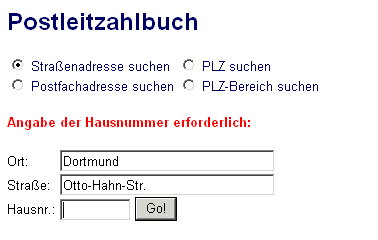
- Nach der Eingabe der Hausnummer bestätigen Sie mit der Schaltfläche "Go!".
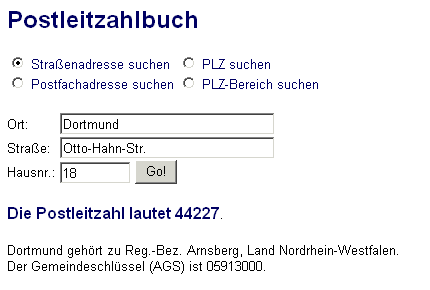
- Nach erfolgreicher Suche erhalten Sie die zu dieser Anschrift gehörige Postleitzahl angezeigt. Zusätzlich werden Daten zur geographischen Zugehörigkeit des Ortes und sein Kreis-Gemeinde-Schlüssel (AGS) ausgegeben.
Ermöglicht das Auffinden von Postfach-Postleitzahlen für einen gewünschten Ort. Es besteht auch die Möglichkeit, sich alle Postfach-Postleitzahlen eines Ortes anzeigen zu lassen.
Der Radiobutton "Postfachadresse suchen" muss markiert sein.
1. Geben Sie den Ortsnamen in das Feld "Ort" ein.
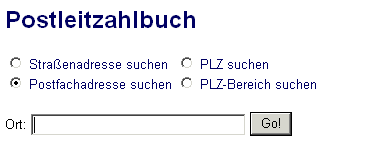
- Falls Ihre Tastatur keine Umlaute bereitstellt, verwenden Sie die Alternativschreibweisen "ae" statt "ä", ... oder "ss" statt "ß", also z.B. "Muenchen".
- Klein- und Großschreibung sowie Sonderzeichen werden bei der Eingabe ignoriert.
- Nach der Eingabe betätigen Sie die Schaltfläche "Go!".
- Wird mehr als ein Ort gefunden, so erscheint der Hinweis "Ortsname nicht eindeutig, bitte wählen". Im Feld "Ort" steht dann der Eintrag "Bitte Ort auswählen" und am rechten Rand des Feldes ein Pfeil. Nach Mausklick auf diesen Pfeil öffnet sich eine Liste und Sie können den gewünschten Ort auswählen. Bestätigen Sie Ihre Auswahl wiederum mit "Go!".
- Im Ortsnamen darf der "*" (Stern) als Joker benutzt werden, z.B. statt "Dortmund" einfach "Dort*", "Dor*d","Do*tm*","*mund". Wird mehr als ein passender Ort gefunden, wird eine Auswahlliste eingeblendet (vgl. oben), wurden zuviele passende Orte gefunden, wird um eine Verfeinerung der Eingabe gebeten.
2. Wird mehr als eine Postfach-PLZ gefunden, so wird zusätzlich die Postfachnummer abgefragt. Geben Sie die Postfachnummer in das Feld "Postfach" ein.
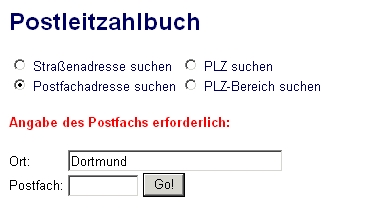
- Nach der Eingabe der Postfachummer bestätigen Sie mit der Schaltfläche "Go!".
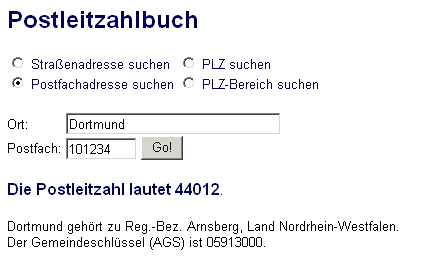
- Nach erfolgreicher Suche erhalten Sie die zu dieser Anschrift gehörige Postleitzahl angezeigt. Zusätzlich werden Daten zur geographischen Zugehörigkeit des Ortes und sein Kreis-Gemeinde-Schlüssel (AGS) ausgegeben.
3. Es ist auch möglich, dass der Ort keine Postfach-PLZ hat, in diesem Fall erscheint der Hinweis "Keine Postleitzahl dieses Typs in diesem Ort!"
Dieser Modus ermöglicht das Auffinden des Ortes zu einer bekannten Postleitzahl.
Der Radiobutton "PLZ suchen" muss markiert sein.
- Geben Sie die PLZ in das Feld PLZ ein.
- Nach der Eingabe betätigen Sie die Schaltfläche "Go!".
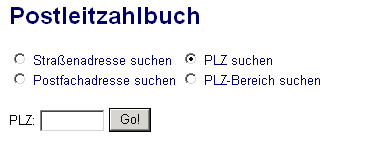
Es wird nur die Eingabe von 5-stelligen Ziffernfolgen akzeptiert. Eingaben mit mehr oder weniger Zeichen bzw. mit Text oder Sonderzeichen werden nicht angenommen und führen zu einer entsprechenden Fehlermeldung.
Dieser Modus ermöglicht das Auffinden der größeren Städte, die zu einem Postleitzahlbereich gehören. Dieser Bereich wird durch die ersten beiden Ziffern der Postleitzahl festgelegt.
Der Radiobutton "PLZ-Bereich suchen" muss markiert sein.
- Geben Sie die ersten beiden Ziffern einer PLZ in das Feld PLZ-Bereich ein.
- Nach der Eingabe betätigen Sie die Schaltfläche "Go!".
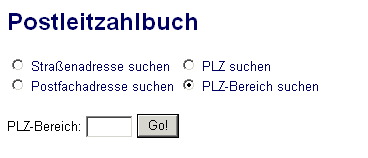
Es wird nur die Eingabe von 2-stelligen Ziffernfolgen akzeptiert. Eingaben mit mehr oder weniger Zeichen bzw. mit Text oder Sonderzeichen werden nicht angenommen und führen zu einer entsprechenden Fehlermeldung.
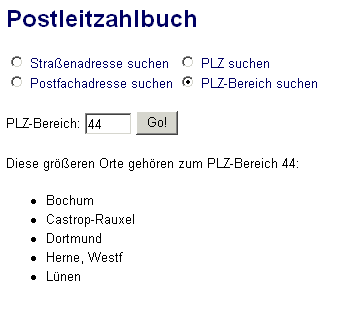
- Nach erfolgreicher Suche erhalten Sie die zu diesem PLZ-Bereich gehörenden größeren Städte angezeigt, d.h. Städte, die mindestens vier verschiedene Postleitzahlen haben.
Bitte beachten Sie folgende Hinweise bei der Benutzung unseren Postleitzahlbuches:
- Alle Auskünfte erfolgen ohne Gewähr.
- Aus lizenzrechtlichen Gründen greifen wir nicht auf den aktuellen Original-Datenbestand der Post zurück. Wir verwenden eine unabhängige Datensammlung. Wenn Sie Fehler finden, informieren Sie uns bitte per E-Mail, wir pflegen die Änderungen dann umgehend ein.
- Zur Benutzung ist aktivierter JavaScript-Support in Ihrem Web-Browser erforderlich.
- Eine englischsprachige Version der PLZ-Auskunft erreichen Sie über das Menü oder diesen Link.
Bei weiteren Fragen kontaktieren Sie uns bitte per E-Mail
unter
info![[at]](/images/at.gif) w3logistics.de.
w3logistics.de.